
Unitouch Studio
Case study: designing and developing a haptic creation tool
One of my main functions at Actronika was to create a tool that allowed the creation of haptic feedback using Actronika’s software (Unitouch SDK) and hardware (Skinetic and HSD).
The challenge was to create something that never existed before: a haptic effect creation tool.
Activities
Designed Unitouch Studio: a tool for creating haptic feedback using Actronika’s tools and products
Conducted UX research through internal interviews, card sorting, and guerrilla usability testing
Collaborated with SDK developers to define representations of graphical operations for editing haptic effects
Developed and maintained Unitouch Studio, addressed usability and functionality tickets
Roles
UX researcher
UI/UX designer
Full-stack developer
Tools
Adobe XD
Adobe Illustrator
Typescript
Svelte
Rust
GitLab
Context
Actronika was transitioning from being a company that integrated haptic feedback for non-recurring engineering projects to a company with flagship products that allowed developers to create rich and personalized haptic feedback.
Actronika already had the SDK for integrating haptic feedback programmatically, an extensive library of effects, and the devices for eliciting haptic feedback.
However, Actronika’s clients and its own workforce required a tool that allowed the creation of personalized haptic effects.
Have a look at a tutorial made by Actronika explaining the main features of Unitouch Studio. The main aspects of the UI and interactions are explained, such as the workflow integrating keyframes for defining haptic effects at different moments in a composition.
Visualizing haptics
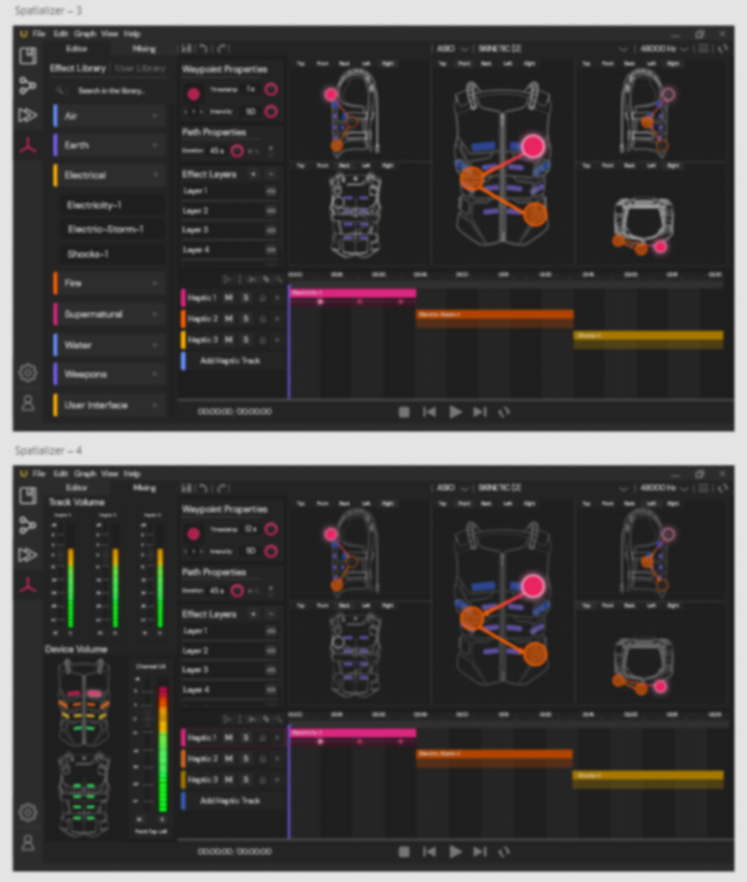
Actronika needed a solution for creating haptic effects. However, one of the main features of the haptic feedback provided by Actronika’s products was spatialization. This means that the haptic effects could be distributed spatially through several points in a given time.
The challenge of creating Unitouch Studio was quite complex. There was a need for a tool that allowed “animating” haptic effects.
The previous approaches used by Actronika consisted of either using the Unitouch SDK or creating the haptic effect in a DAW. None of the previous approaches provided visual feedback about the localization of the haptic effect.
Basically, there was a need for a haptic sequencer and spatializer that displayed how the haptic effect changes in time.
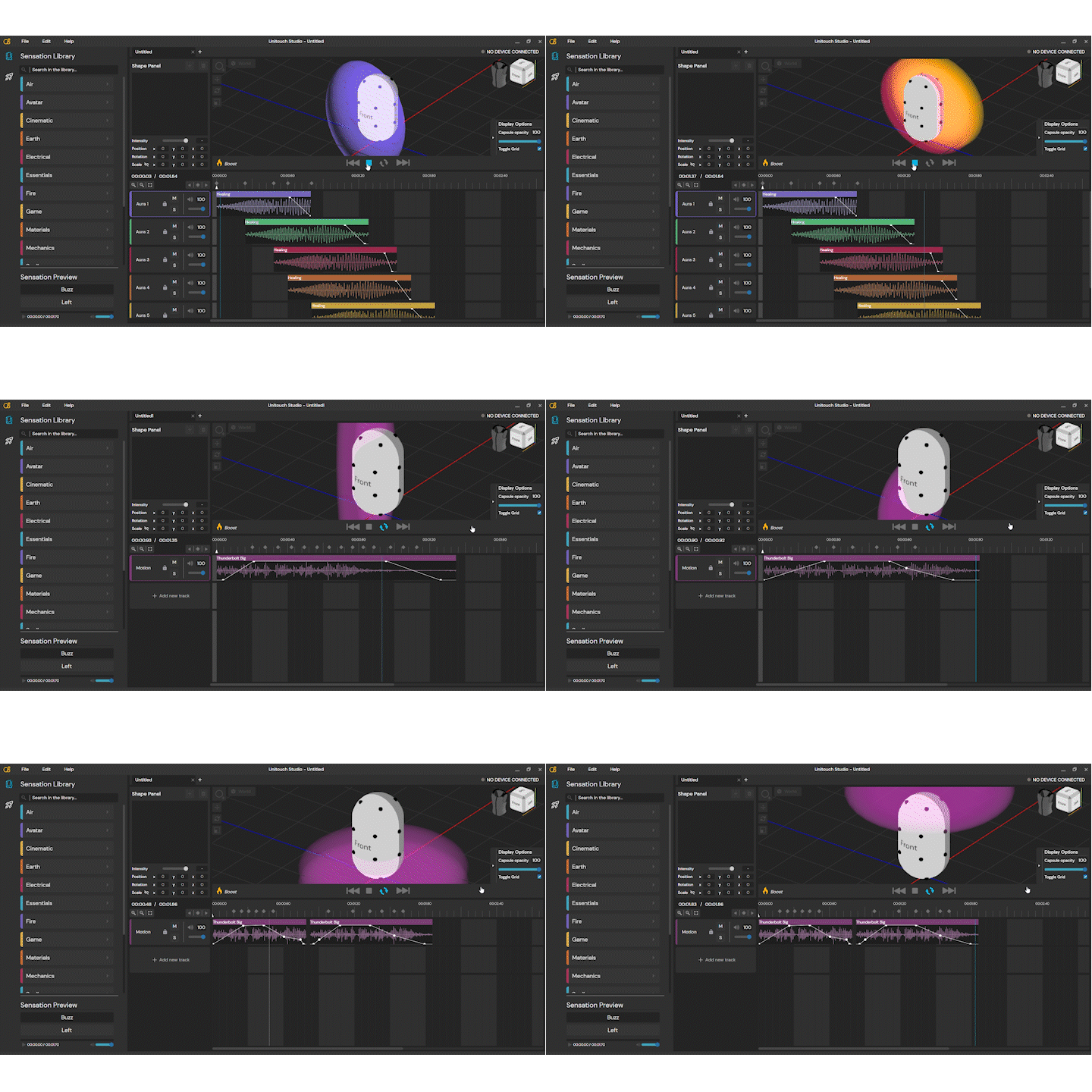
Unitouch Studio allowed users to visualize the areas where the haptic effects were applied. These areas were represented by spheres that could be edited within the UI.
User research
I conducted in-depth user interviews with different profiles that could use Unitouch Studio. Ranging from mechanical engineers to audio designers, the idea was to create a tool easy to use and understand for a wide diversity of profiles who were looking for design haptic effects.
I used several UX research strategies, such as card sorting for determining the main needs of the users, as well as guerrilla usability testing for evaluating early prototype versions.
I worked in depth with Actronika’s product manager and R&D director to evaluate the needs of users and create user personas to identify the user profiles and their possible behaviors.
After Unitouch Studio’s first release, users’ and clients’ feedback was constantly integrated to enhance the application’s usability and to simplify the different workflows and actions to create haptic effects.
Creating a hybrid workflow
Once the different users’ profiles and actions were defined. The next step was to create a user interface.
Since we were developing a software that didn’t have an equivalent used in the industry, I had to consider the integration of different existing software solutions and their workflows.
Unitouch Studio interface combined the UI/UX workflow of an animation tool, using keyframes to define the different spatialization configurations for the Skinetic vest.
Additionally, Unitouch Studio behaved like a digital audio workspace (DAW), allowing multi-track sequencing, automation, haptic clip editing, and track mixing.
Unitouch Studio integrated keyframe interactions from animation software that allowed users to set the position of a haptic effect in a specific timestamp.
A collaborative effort
Actronika's development team feedback was integrated into the design loop from the very beginning. Once the development phase started, my main collaborator was Actronika's R&D engineer. The exchanges between both of us helped define the actions and outcomes that were technically feasible within the UI.
The team responsible for developing the Unitouch SDK was brought into the interaction design loop, providing input that proved essential for defining interactions around sample editing, 3D effect manipulation, and device management. Actronika's sound and haptic designer contributed a unique perspective on envisioning the sequencer and spatialization interface, bringing expertise in haptic effect creation that shaped some of the tool's most distinctive features.
Actronika's developers were the first to test Unitouch Studio. As both the builders and primary users of Actronika's tools, their vision was paramount for validating and refining the interaction model
This video tutorial explains the shape-based spatialization workflow. This workflow was designed in collaboration with Actronika’s development team to translate Unitouch SDK features to an effective and understandable user experience.
A tale of two workspaces
When I first designed Unitouch Studio, the SDK containing its functionalities only allowed assigning an intensity to each actuator. This functionality was used as the basis for the first workspace for Unitouch Studio: a grid displaying different views of the Skinetic, where users could easily set an effect on the sides of the vest.
Eventually, the SDK got more sophisticated, and it allowed assigning intensities to the actuators through a mathematical model. This functionality got its UI in Unitouch Studio, bringing interesting insights about the user profiles for each workflow.
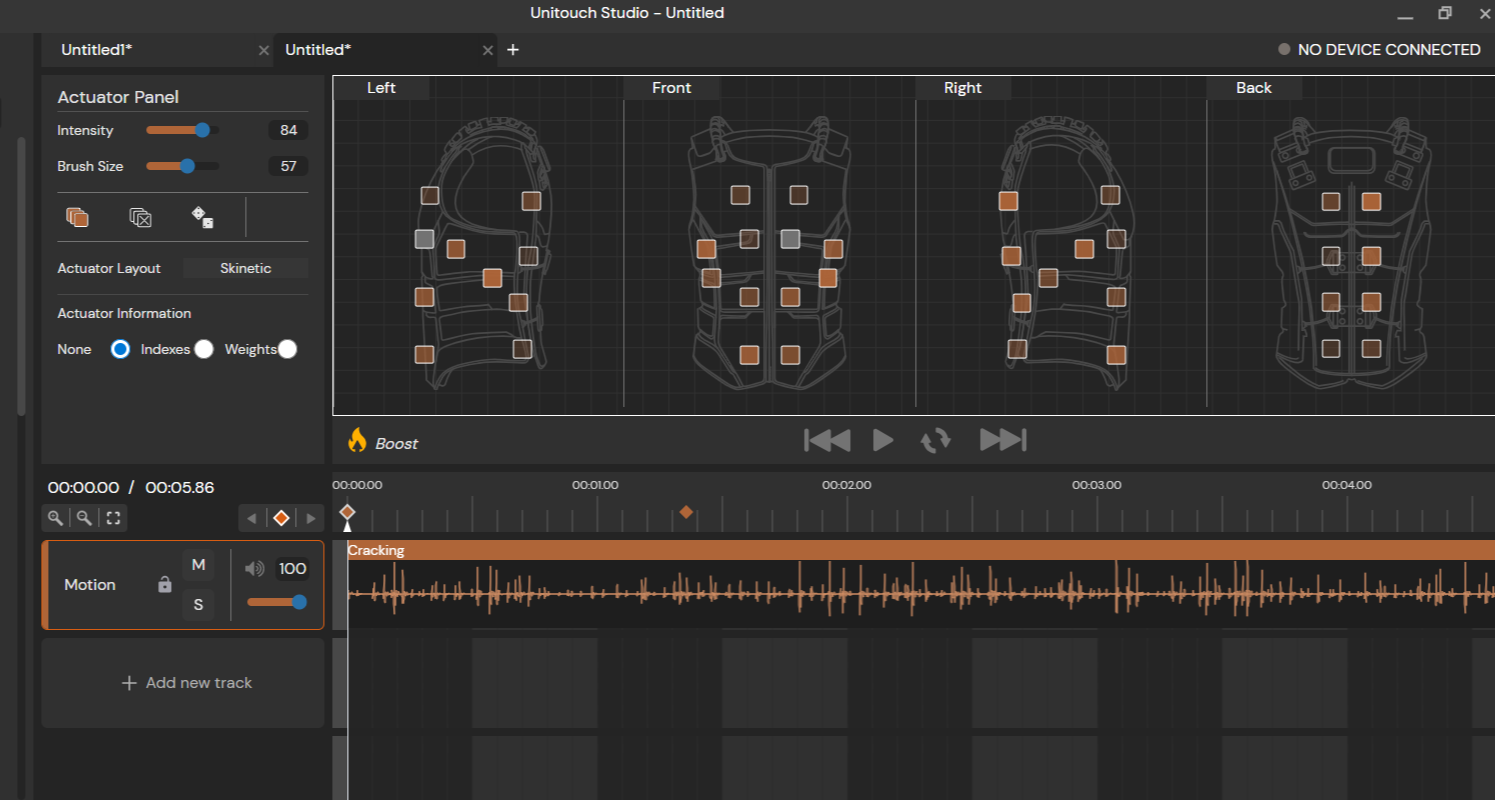
Actuator-based workspace
The Actuator-based workspace displays different perspectives of a haptic device in 2D. Users can set each actuator to a specific intensity, enabling more precise control.
This was the first approach we conceived for Unitouch Studio. We added a brush functionality for “painting” multiple intensities at the same time. The UI also allowed setting a fixed intensity for each side/view of Skinetic.
Further versions of Unitouch Studio allowed the integration of other Actronika’s products, such as the HSD. I integrated a functionality where users could upload their own actuator layout so they could create effects for their own haptic devices using Actronika’s development kit.
Shape-based workspace
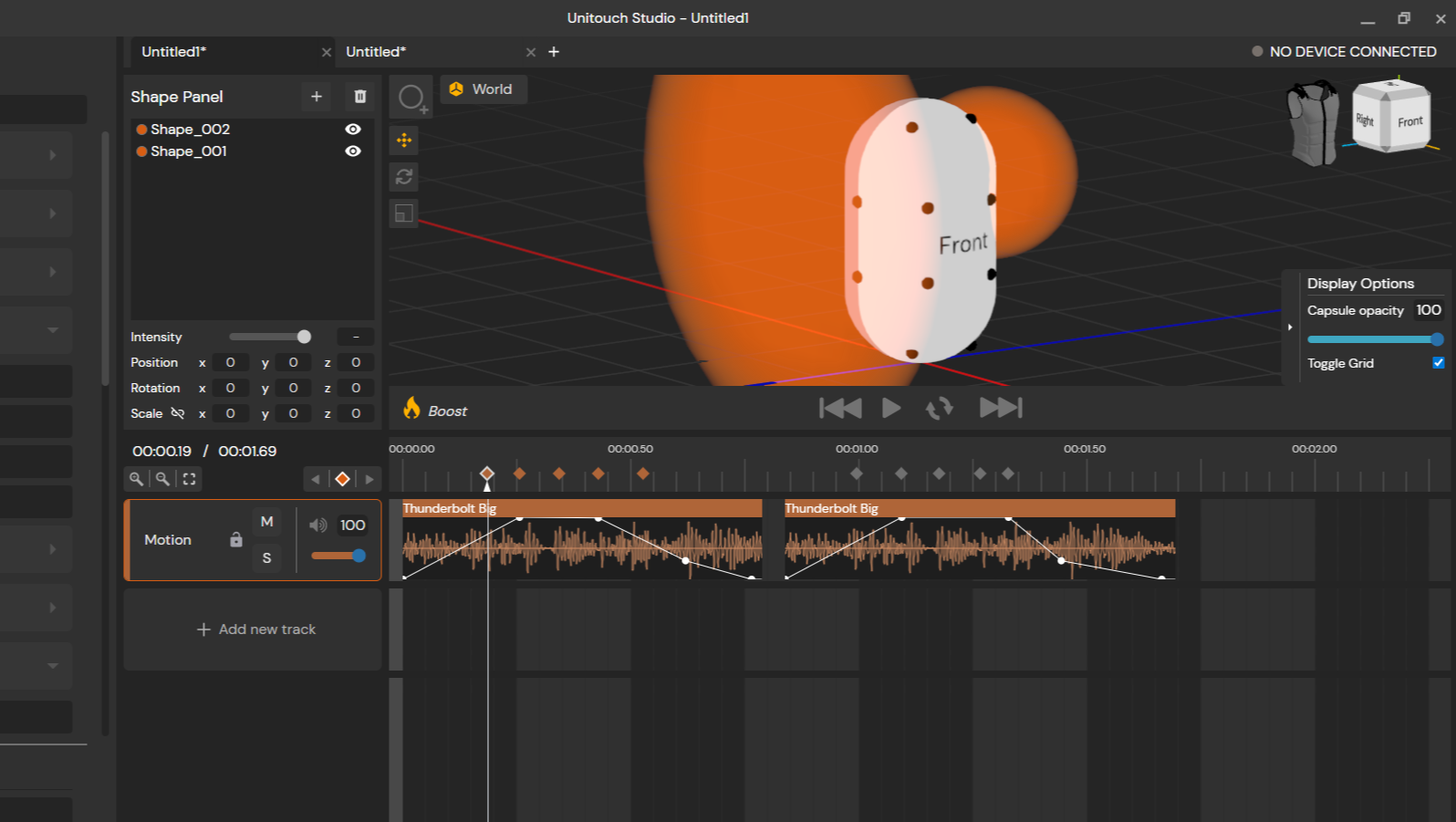
The shape-based workspace was created for adapting to the concept of “vicinities” developed by the engineering team at Actronika. The idea was to define 3D shapes around the haptic vest to have a more natural distribution and gradient of the haptic effect. The closer the actuator was to the center of the shape, the stronger the effect.
The shape-based workflow was designed with game developers in mind, who are familiar with the main 3D interactions of translation, rotation, and scale.
It was imperative to make users understand that the calculation of the actuator’s intensity was in relation to a mathematical capsule model with actuator positions that did not match the physical placement of the actuators of the Skinetic vest. Therefore, I integrated a 3D model that could serve as visual guidance to users so they could better understand which side of the vest was being affected by the shape containing the haptic effect.
The outcome
The design process led to four key outcomes:
A tool for creating spatialized haptic feedback for Actronika’s products. Initially designed around Skinetic's workflow, the UI was expanded as Actronika's SDK evolved to support a wider range of devices, adapting the interaction to a broader set of use cases.
A UI/UX adapted to a wide variety of user profiles. One of the core design outcomes was an interface that served two very different audiences without compromising either experience: users from the immersive entertainment industry, who needed an intuitive shape-based 3D workspace, and R&D teams, who required control over individual actuators. The result was a dual-workspace interface that allowed both profiles to work within the same tool.
A key component for product adoption. Unitouch Studio was offered as part of the software counterpart of Actronika’s devices. A library of pre-made effects was integrated to accelerate the development of personalised haptic feedback for productions. The commercial team presented demos of Unitouch Studio to illustrate not only the wide variety of effects but also to show clients that they could exploit the potential of Actronika’s products.
The UI of Actronika’s technology. The functions developed in the Unitouch SDK over more than 8 years at Actronika found their visual counterpart in Unitouch Studio. Beyond Actronika's own devices, the tool extended haptic design to any device that could work as a loudspeaker, becoming Actronika's definitive proposition for haptic design.
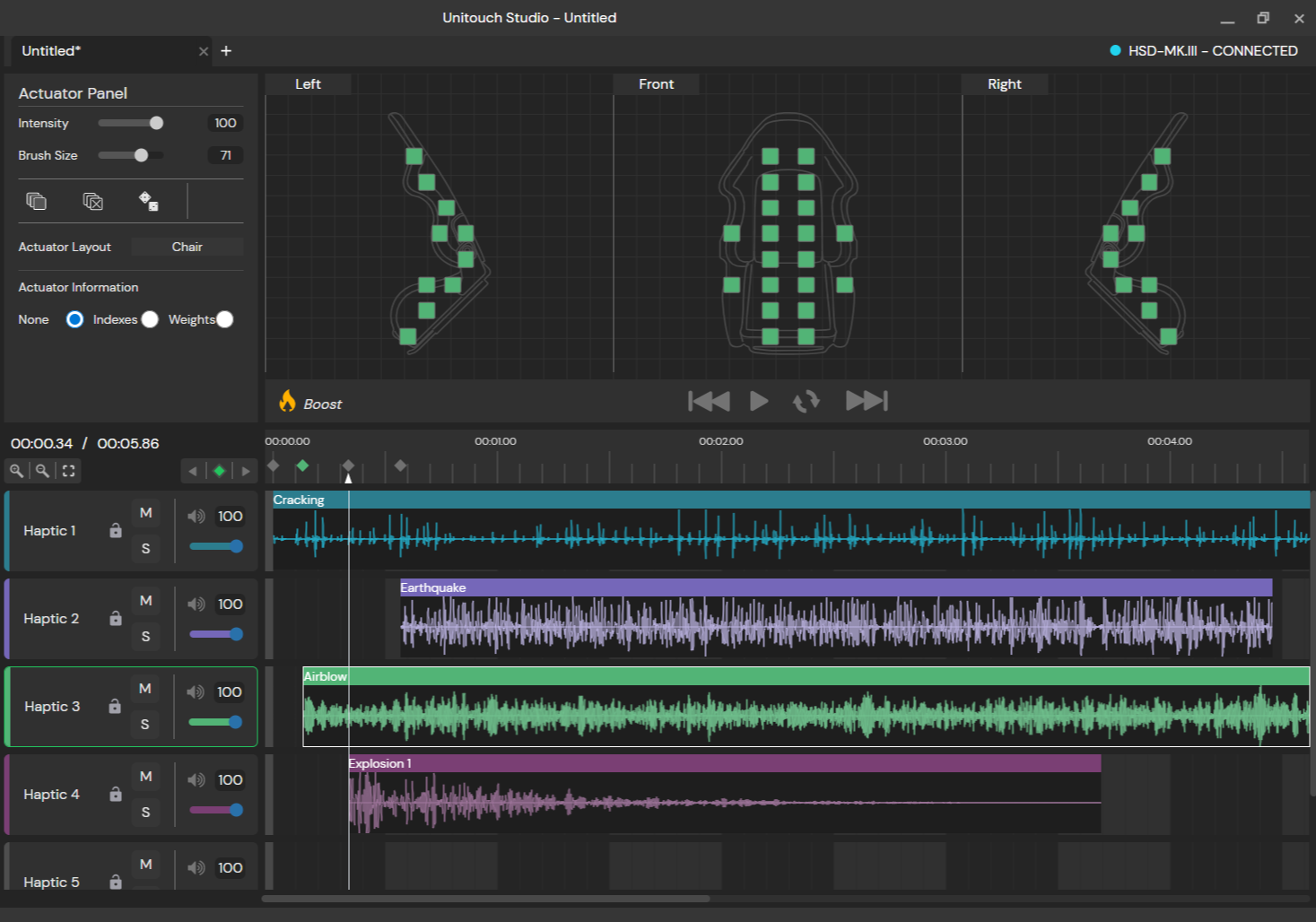
This image showcases the possibility of adding other actuator layouts beyond the Skinetic configuration. In this case, a chair with 20 actuators is depicted. The chair with the integrated actuators was a constant use-case proposed by the commercial team to clients in the automotive industry.
Development and maintenance
After some time, I had to take on the task of developing and maintaining Unitouch Studio. I learned web development tools and languages such as TypeScript and Svelte, as well as Rust for backend programming.
I also became familiar with the application's deployment process and worked more closely with the development team to integrate new functionalities.
In the end, I managed to create an application from scratch: starting from interviews and UI sketches, then moving on to wireframes, functional mock-ups, and finally programming it, even fixing some CI/CD issues along the way.
I also managed quite a bunch of usability and bug tickets to keep Unitouch Studio continuously updated, functional, and easy to use. ;)
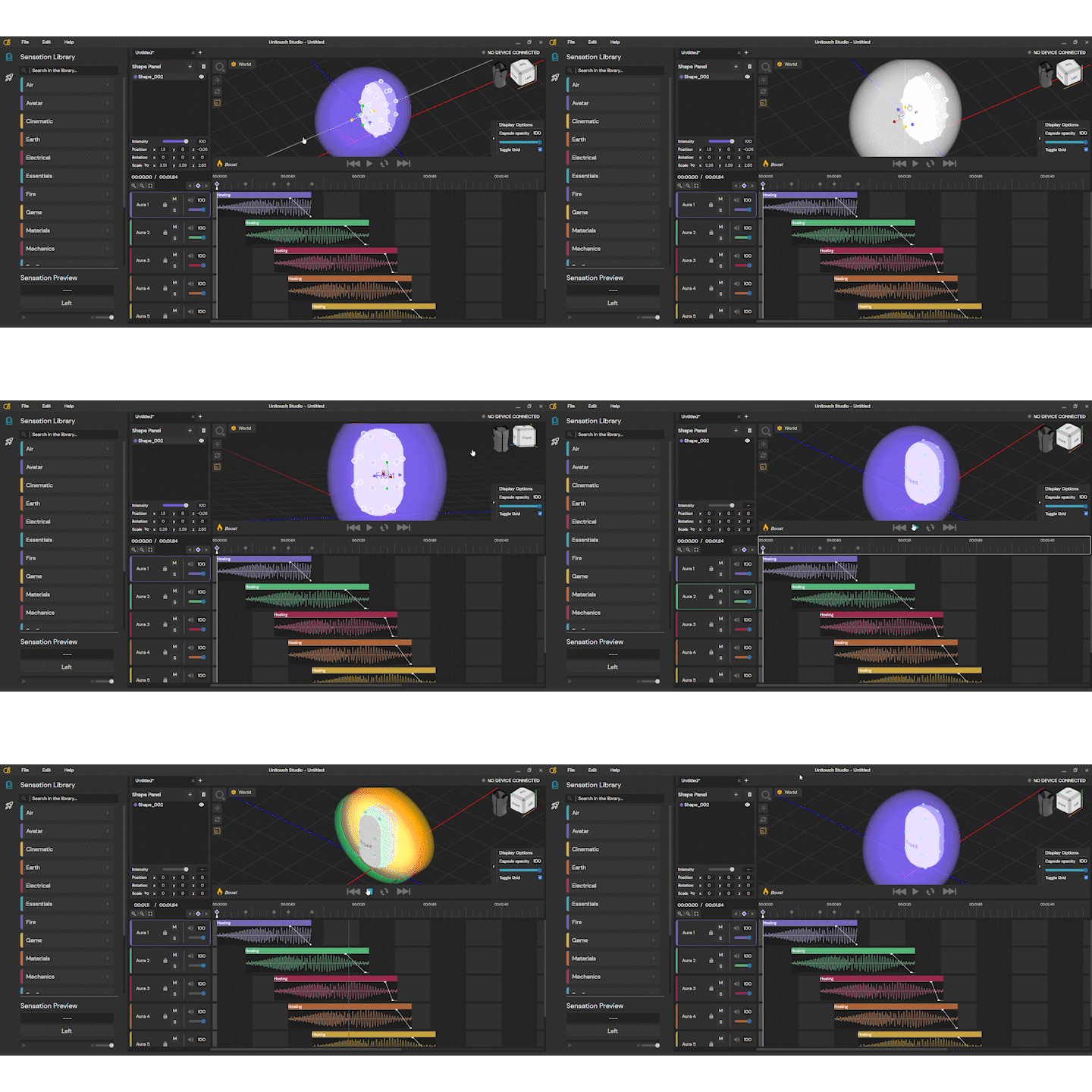
Unitouch Studio integrated 3D interactions for editing zones that represented a haptic effect spatially distributed within Skinetic’s actuators. This functionality was possible with the integration of Three.js and the Svelte framework. The application was constructed with Tauri, having Rust as the main language for back-end development.